
Until recently, I didn’t know you could have a binary action that did two things within a single Reaper Action.
I have always wanted to set up a Reaper mouse modifier for the mouse scroll wheel to adjust item volume, but in Reaper’s mouse settings there is no way to assign actions to the mouse wheel, only left click, left drag, and double click.
However, we can get around this by creating a custom action using the following action list items:
- Skip next action if CC parameter >0/mid
- Skip next action if CC parameter <0/mid
With these, we can create a binary action and assign it to the mouse wheel so that mouse wheel up performs one action and mouse wheel down performs another.
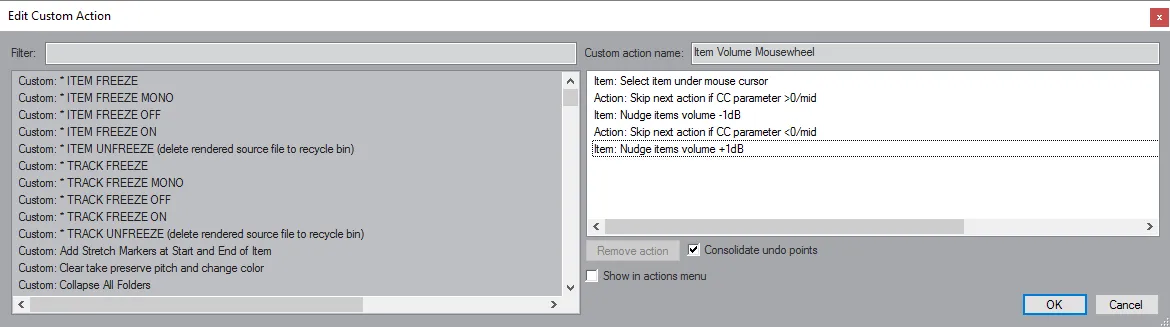
In my case I assigned the above custom action to alt+mousewheel, so that whenever I press alt and scroll the mousewheel over an item, it adjusts that item’s volume by +/-1dB increments. This is often be faster than clicking and dragging the item volume knob or item volume line.
Comments7
Wow! I wouldn't have thought of that!
Yes! Thank you so much!
Yes, scroll must be an option on mouse actions. Very effectual idea. Mil gracias.
Thanks man !
Great stuff, this totally came in clutch for my quick pitch editing workflow!
I always had a script for that made by someone. After moving to a different machine the script has gone. Your trick still works and is worth so much more to me than you can imagine! Thank you!!!
I needed that, Thank you Stephen.